

Weird blurry black text
- Thread starter meesterkees
- Start date
You are using an out of date browser. It may not display this or other websites correctly.
You should upgrade or use an alternative browser.
You should upgrade or use an alternative browser.

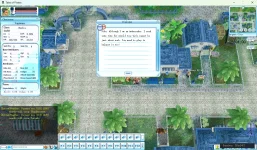



i can make changes like arial font but the blurry black stays.Client\scripts\lua\font.clu
After making the changes, run compile_clu.bat; otherwise, the new font will not be used.
Even changes to preperty.clu changing text works but it never changes the color always black blurry if i use a color undefined in gui.clu it wil change to a light gray also barely readable.
only thing i managed to make work with help of AI is changes to mindpower engine in source making all text red but that also makes everything blurry.

LV
4
- Joined
- Jan 29, 2026
- Messages
- 131
- Reaction score
- 128
- Points
- 88
- Age
- 41
Open the form script, for example, preperty.clu, and find the code for the label, for example:
UI_SetTextColor( labConshow, COLOR_PURPLE )
COLOR_PURPLE - The main text color.
The color codes are set in gui.clu.
Next come the additional settings.
UI_SetLabelExFont( labConshow, DEFAULT_FONT, TRUE, COLOR_WHITE )
DEFAULT_FONT - font from font.clu
TRUE - turning on the font shadow, FALSE - turning off the font shadow
COLOR_WHITE - font shadow color
Code:
labConshow = UI_CreateCompent( frmState, LABELEX_TYPE, "labConshow", 23, 8, 49, 191 )
UI_SetCaption( labConshow, "9527" )
UI_SetTextColor( labConshow, COLOR_PURPLE )
UI_SetLabelExFont( labConshow, DEFAULT_FONT, TRUE, COLOR_WHITE )
UI_SetTextColor( labConshow, COLOR_PURPLE )
COLOR_PURPLE - The main text color.
The color codes are set in gui.clu.
Code:
COLOR_BLACK = 4278190080
COLOR_RED = 4294901760
COLOR_WHITE = 4294967295
COLOR_PURPLE = 4293990336
COLOR_YELLOW = 4294967040
COLOR_BLUE = 4278190335
COLOR_GREEN = 4278255360
COLOR_PINK = 4294902015
Next come the additional settings.
UI_SetLabelExFont( labConshow, DEFAULT_FONT, TRUE, COLOR_WHITE )
DEFAULT_FONT - font from font.clu
TRUE - turning on the font shadow, FALSE - turning off the font shadow
COLOR_WHITE - font shadow color
thx for the effort these things did not change anything. however i fixed the problem somehow. i never ran compiler_table after i did (i dont know why or how) it got fixed.Open the form script, for example, preperty.clu, and find the code for the label, for example:
Code:labConshow = UI_CreateCompent( frmState, LABELEX_TYPE, "labConshow", 23, 8, 49, 191 ) UI_SetCaption( labConshow, "9527" ) UI_SetTextColor( labConshow, COLOR_PURPLE ) UI_SetLabelExFont( labConshow, DEFAULT_FONT, TRUE, COLOR_WHITE )
UI_SetTextColor( labConshow, COLOR_PURPLE )
COLOR_PURPLE - The main text color.
The color codes are set in gui.clu.
Code:COLOR_BLACK = 4278190080 COLOR_RED = 4294901760 COLOR_WHITE = 4294967295 COLOR_PURPLE = 4293990336 COLOR_YELLOW = 4294967040 COLOR_BLUE = 4278190335 COLOR_GREEN = 4278255360 COLOR_PINK = 4294902015
Next come the additional settings.
UI_SetLabelExFont( labConshow, DEFAULT_FONT, TRUE, COLOR_WHITE )
DEFAULT_FONT - font from font.clu
TRUE - turning on the font shadow, FALSE - turning off the font shadow
COLOR_WHITE - font shadow col
now i can change things in clu files and it actually works