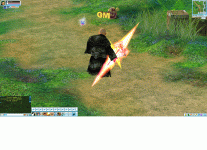

Glows on DX9 version
- Thread starter keichan2
- Start date
You are using an out of date browser. It may not display this or other websites correctly.
You should upgrade or use an alternative browser.
You should upgrade or use an alternative browser.





LV
4
- Joined
- Jan 29, 2026
- Messages
- 116
- Reaction score
- 107
- Points
- 88
- Age
- 41
If it's simple, then take the ItemRefineInfo.txt and ItemRefineEffectInfo.txt files from another client that has a glow. If it's complicated, then read the following spoiler:
# CItemRefineSet and CItemRefineEffectSet Tables
Two client-side loadable tables that control **visual effects for weapons and equipment** during forging and gem enhancement. They define item texture glow and particle attachment to the model.
---
## 1. CItemRefineSet (ItemRefineInfo)
### Purpose
Maps **item ID** to a set of **effect IDs** and **scales** for different character types. Indexed by item ID (nItemID).
### Data Source
- **File:** `scripts/table/ItemRefineInfo` (txt/bin)
- **Loading:** `GameAppInterface.cpp`, during client initialization
- **ID range:** 0 … `g_Config.m_nMaxItemType`
### CItemRefineInfo Structure
| Field | Type | Description |
|-------|------|-------------|
| `Value[14]` | short[ITEM_REFINE_NUM] | 14 effect indices. Each index is an ID of a record in ItemRefineEffectInfo. The index is chosen based on gem type combination (see Lua `Item_Stoneeffect`). |
| `fChaEffectScale[4]` | float[4] | Particle scale for 4 character types (Lance, Carsise, Phyllis, Ami). Used in `SetForgeEffect` when creating effects. |
### Table Format (ItemRefineInfo.txt)
- **Columns 1–14:** `Value[0]` … `Value[13]` — effect IDs from ItemRefineEffectInfo
- **Columns 15–18:** `fChaEffectScale[0]` … `fChaEffectScale[3]`
Example row:
```
4 Serpentine Sword 3 9 0 12 26 0 25 0 24 0 0 27 0 0 0.6 1.0 1.0 0.7
```
- Item ID: 4
- Value: 3, 9, 0, 12, 26, 0, 25, 0, 24, 0, 0, 27, 0, 0
- fChaEffectScale: 0.6, 1.0, 1.0, 0.7
---
## 2. CItemRefineEffectSet (ItemRefineEffectInfo)
### Purpose
Defines a **specific visual effect**: texture glow ID and particle IDs for each character type and attachment point (dummy).
### Data Source
- **File:** `scripts/table/ItemRefineEffectInfo` (txt/bin)
- **Loading:** `GameAppInterface.cpp`
- **ID range:** 0 … 5000
### CItemRefineEffectInfo Structure
| Field | Type | Description |
|-------|------|-------------|
| `nLightID` | int | Texture glow set ID (ItemLit). 0 = no glow. Used in `LitResetTexture(item_id, level)`. |
| `sEffectID[4][4]` | short[REFINE_EFFECT_CHA_NUM][REFINE_EFFECT_NUM] | 4×4 matrix: [character type][effect slot] → base effect ID. Final ID = `sEffectID * 10 + Level` (Level 0–3). |
| `chDummy[4]` | char[4] | Item model dummy bone indices for particle attachment (0–5, etc.). |
| `_sEffectNum[4]` | int[4] (private) | Number of active effects per character type (computed at load time). |
### Table Format (ItemRefineEffectInfo.txt)
- **Column 1:** Record ID
- **Column 2:** Name (not used in code)
- **Column 3:** nLightID (Glow ID)
- **Columns 4–7:** Effect ID 1 for Lance, Carsise, Phyllis, Ami
- **Column 8:** Dummy 1
- **Columns 9–12:** Effect ID 2 for four characters
- **Column 13:** Dummy 2
- … same pattern for Effect 3 and 4
Example:
```
1 Staff Bonus 3 0 0 300 300 4 0 0 301 301 4 0 0 302 302 0 0 0 0 0 0
```
- nLightID = 3
- Effects: 300, 301, 302 for Phyllis/Ami, dummy 4
---
## 3. Usage Chain
### 3.1. Effect Selection by Gems
Lua function `Item_Stoneeffect(Stone_Type1, Stone_Type2, Stone_Type3)` returns 1–14 (or 0 if no effect). This is the index into the `Value[]` array of ItemRefineInfo.
Gem types are defined in `CStoneInfo::nType`. Combinations determine which of the 14 effect slots to use (single type, two types, three types, etc.).
### 3.2. Data Retrieval in Code
```
SItemForge::Refresh(nItemID):
1. Item_Stoneeffect(nStoneType[0], nStoneType[1], nStoneType[2]) → nEffectID (1-based)
2. nEffectID-- (convert to 0-based)
3. pRefineInfo = GetItemRefineInfo(nItemID) // by item ID
4. pEffectInfo = GetItemRefineEffectInfo(pRefineInfo->Value[nEffectID]) // by effect ID
5. nEffectLevel = (nLevel - 1) / 4 // 0–3 by forge level
```
### 3.3. Applying the Effect (CSceneItem::SetForgeEffect)
1. **Texture glow:**
`LitResetTexture(pInfo->nLightID, Level)` — replace item texture with animated glow by level (0–3).
2. **Particles:**
For each active effect:
- `nEffectID = pInfo->sEffectID[nCharID] * 10 + Level`
- `pEffect->Create(nEffectID)` — create effect
- `pEffect->setFollowObj(pItem, NODE_ITEM, pInfo->chDummy)` — attach to dummy
- `pEffect->SetScale(Forge.pRefineInfo->fChaEffectScale[nCharID], ...)` — scale from ItemRefineInfo
- `pEffect->SetAlpha(SItemForge::GetAlpha(Forge.nLevel))` — alpha by forge level
---
## 4. Constants
| Constant | Value | Description |
|----------|-------|-------------|
| `ITEM_REFINE_NUM` | 14 | Number of effect slots in ItemRefineInfo |
| `REFINE_EFFECT_NUM` | 4 | Maximum particles per effect |
| `REFINE_EFFECT_CHA_NUM` | 4 | Number of character types (Lance, Carsise, Phyllis, Ami) |
---
## 5. Code Usage
| File | Usage |
|------|-------|
| `SceneItem.cpp` | `SetForgeEffect` — glow and particles on world items |
| `GameAppMsg.cpp` | Handling `left/right` and `forge` commands — effects on character equipment |
| `UIItemCommand.cpp` | `SItemForge::Refresh`, `GetForgeInfo` — hints and forge level display |
| `GameAppInterface.cpp` | Table loading, binary export |
---
## 6. Relation to Other Systems
- **ItemLit (lwItemLit):** glow textures by `nLightID` and level
- **CEffectObj:** particles by `sEffectID * 10 + Level`
- **CStoneSet / CStoneInfo:** gem types for `Item_Stoneeffect`
- **SItemForge:** structure combining forge, gem, and effect data
Two client-side loadable tables that control **visual effects for weapons and equipment** during forging and gem enhancement. They define item texture glow and particle attachment to the model.
---
## 1. CItemRefineSet (ItemRefineInfo)
### Purpose
Maps **item ID** to a set of **effect IDs** and **scales** for different character types. Indexed by item ID (nItemID).
### Data Source
- **File:** `scripts/table/ItemRefineInfo` (txt/bin)
- **Loading:** `GameAppInterface.cpp`, during client initialization
- **ID range:** 0 … `g_Config.m_nMaxItemType`
### CItemRefineInfo Structure
| Field | Type | Description |
|-------|------|-------------|
| `Value[14]` | short[ITEM_REFINE_NUM] | 14 effect indices. Each index is an ID of a record in ItemRefineEffectInfo. The index is chosen based on gem type combination (see Lua `Item_Stoneeffect`). |
| `fChaEffectScale[4]` | float[4] | Particle scale for 4 character types (Lance, Carsise, Phyllis, Ami). Used in `SetForgeEffect` when creating effects. |
### Table Format (ItemRefineInfo.txt)
- **Columns 1–14:** `Value[0]` … `Value[13]` — effect IDs from ItemRefineEffectInfo
- **Columns 15–18:** `fChaEffectScale[0]` … `fChaEffectScale[3]`
Example row:
```
4 Serpentine Sword 3 9 0 12 26 0 25 0 24 0 0 27 0 0 0.6 1.0 1.0 0.7
```
- Item ID: 4
- Value: 3, 9, 0, 12, 26, 0, 25, 0, 24, 0, 0, 27, 0, 0
- fChaEffectScale: 0.6, 1.0, 1.0, 0.7
---
## 2. CItemRefineEffectSet (ItemRefineEffectInfo)
### Purpose
Defines a **specific visual effect**: texture glow ID and particle IDs for each character type and attachment point (dummy).
### Data Source
- **File:** `scripts/table/ItemRefineEffectInfo` (txt/bin)
- **Loading:** `GameAppInterface.cpp`
- **ID range:** 0 … 5000
### CItemRefineEffectInfo Structure
| Field | Type | Description |
|-------|------|-------------|
| `nLightID` | int | Texture glow set ID (ItemLit). 0 = no glow. Used in `LitResetTexture(item_id, level)`. |
| `sEffectID[4][4]` | short[REFINE_EFFECT_CHA_NUM][REFINE_EFFECT_NUM] | 4×4 matrix: [character type][effect slot] → base effect ID. Final ID = `sEffectID * 10 + Level` (Level 0–3). |
| `chDummy[4]` | char[4] | Item model dummy bone indices for particle attachment (0–5, etc.). |
| `_sEffectNum[4]` | int[4] (private) | Number of active effects per character type (computed at load time). |
### Table Format (ItemRefineEffectInfo.txt)
- **Column 1:** Record ID
- **Column 2:** Name (not used in code)
- **Column 3:** nLightID (Glow ID)
- **Columns 4–7:** Effect ID 1 for Lance, Carsise, Phyllis, Ami
- **Column 8:** Dummy 1
- **Columns 9–12:** Effect ID 2 for four characters
- **Column 13:** Dummy 2
- … same pattern for Effect 3 and 4
Example:
```
1 Staff Bonus 3 0 0 300 300 4 0 0 301 301 4 0 0 302 302 0 0 0 0 0 0
```
- nLightID = 3
- Effects: 300, 301, 302 for Phyllis/Ami, dummy 4
---
## 3. Usage Chain
### 3.1. Effect Selection by Gems
Lua function `Item_Stoneeffect(Stone_Type1, Stone_Type2, Stone_Type3)` returns 1–14 (or 0 if no effect). This is the index into the `Value[]` array of ItemRefineInfo.
Gem types are defined in `CStoneInfo::nType`. Combinations determine which of the 14 effect slots to use (single type, two types, three types, etc.).
### 3.2. Data Retrieval in Code
```
SItemForge::Refresh(nItemID):
1. Item_Stoneeffect(nStoneType[0], nStoneType[1], nStoneType[2]) → nEffectID (1-based)
2. nEffectID-- (convert to 0-based)
3. pRefineInfo = GetItemRefineInfo(nItemID) // by item ID
4. pEffectInfo = GetItemRefineEffectInfo(pRefineInfo->Value[nEffectID]) // by effect ID
5. nEffectLevel = (nLevel - 1) / 4 // 0–3 by forge level
```
### 3.3. Applying the Effect (CSceneItem::SetForgeEffect)
1. **Texture glow:**
`LitResetTexture(pInfo->nLightID, Level)` — replace item texture with animated glow by level (0–3).
2. **Particles:**
For each active effect:
- `nEffectID = pInfo->sEffectID[nCharID] * 10 + Level`
- `pEffect->Create(nEffectID)` — create effect
- `pEffect->setFollowObj(pItem, NODE_ITEM, pInfo->chDummy)` — attach to dummy
- `pEffect->SetScale(Forge.pRefineInfo->fChaEffectScale[nCharID], ...)` — scale from ItemRefineInfo
- `pEffect->SetAlpha(SItemForge::GetAlpha(Forge.nLevel))` — alpha by forge level
---
## 4. Constants
| Constant | Value | Description |
|----------|-------|-------------|
| `ITEM_REFINE_NUM` | 14 | Number of effect slots in ItemRefineInfo |
| `REFINE_EFFECT_NUM` | 4 | Maximum particles per effect |
| `REFINE_EFFECT_CHA_NUM` | 4 | Number of character types (Lance, Carsise, Phyllis, Ami) |
---
## 5. Code Usage
| File | Usage |
|------|-------|
| `SceneItem.cpp` | `SetForgeEffect` — glow and particles on world items |
| `GameAppMsg.cpp` | Handling `left/right` and `forge` commands — effects on character equipment |
| `UIItemCommand.cpp` | `SItemForge::Refresh`, `GetForgeInfo` — hints and forge level display |
| `GameAppInterface.cpp` | Table loading, binary export |
---
## 6. Relation to Other Systems
- **ItemLit (lwItemLit):** glow textures by `nLightID` and level
- **CEffectObj:** particles by `sEffectID * 10 + Level`
- **CStoneSet / CStoneInfo:** gem types for `Item_Stoneeffect`
- **SItemForge:** structure combining forge, gem, and effect data
Last edited:

LV
4
- Joined
- Jan 29, 2026
- Messages
- 116
- Reaction score
- 107
- Points
- 88
- Age
- 41
You also have a cloak on your ass. In the iteminfo for the Admiral's cloak, the effect id and attachment bone are set in the effects column. You have 4015,3 - try setting 4015,24
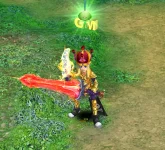
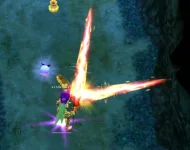
I still could not find the way to use the last tier effect, in the scripts i could see it has 4 tier as usual on 1, 5, 9 and 13 but the last one is different, i just want to use the same effects as in the original like this
with this clear wave effect but in the server it just looks like this
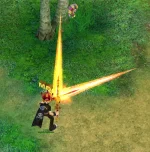
same app and the most obvious just to see how different it looks x.x
with this clear wave effect but in the server it just looks like this
same app and the most obvious just to see how different it looks x.x
and thank you btw i could find some rly cool effects like this one <3If it's simple, then take the ItemRefineInfo.txt and ItemRefineEffectInfo.txt files from another client that has a glow. If it's complicated, then read the following spoiler:
# CItemRefineSet and CItemRefineEffectSet Tables
Two client-side loadable tables that control **visual effects for weapons and equipment** during forging and gem enhancement. They define item texture glow and particle attachment to the model.
---
## 1. CItemRefineSet (ItemRefineInfo)
### Purpose
Maps **item ID** to a set of **effect IDs** and **scales** for different character types. Indexed by item ID (nItemID).
### Data Source
- **File:** `scripts/table/ItemRefineInfo` (txt/bin)
- **Loading:** `GameAppInterface.cpp`, during client initialization
- **ID range:** 0 … `g_Config.m_nMaxItemType`
### CItemRefineInfo Structure
| Field | Type | Description |
|-------|------|-------------|
| `Value[14]` | short[ITEM_REFINE_NUM] | 14 effect indices. Each index is an ID of a record in ItemRefineEffectInfo. The index is chosen based on gem type combination (see Lua `Item_Stoneeffect`). |
| `fChaEffectScale[4]` | float[4] | Particle scale for 4 character types (Lance, Carsise, Phyllis, Ami). Used in `SetForgeEffect` when creating effects. |
### Table Format (ItemRefineInfo.txt)
- **Columns 1–14:** `Value[0]` … `Value[13]` — effect IDs from ItemRefineEffectInfo
- **Columns 15–18:** `fChaEffectScale[0]` … `fChaEffectScale[3]`
Example row:
```
4 Serpentine Sword 3 9 0 12 26 0 25 0 24 0 0 27 0 0 0.6 1.0 1.0 0.7
```
- Item ID: 4
- Value: 3, 9, 0, 12, 26, 0, 25, 0, 24, 0, 0, 27, 0, 0
- fChaEffectScale: 0.6, 1.0, 1.0, 0.7
---
## 2. CItemRefineEffectSet (ItemRefineEffectInfo)
### Purpose
Defines a **specific visual effect**: texture glow ID and particle IDs for each character type and attachment point (dummy).
### Data Source
- **File:** `scripts/table/ItemRefineEffectInfo` (txt/bin)
- **Loading:** `GameAppInterface.cpp`
- **ID range:** 0 … 5000
### CItemRefineEffectInfo Structure
| Field | Type | Description |
|-------|------|-------------|
| `nLightID` | int | Texture glow set ID (ItemLit). 0 = no glow. Used in `LitResetTexture(item_id, level)`. |
| `sEffectID[4][4]` | short[REFINE_EFFECT_CHA_NUM][REFINE_EFFECT_NUM] | 4×4 matrix: [character type][effect slot] → base effect ID. Final ID = `sEffectID * 10 + Level` (Level 0–3). |
| `chDummy[4]` | char[4] | Item model dummy bone indices for particle attachment (0–5, etc.). |
| `_sEffectNum[4]` | int[4] (private) | Number of active effects per character type (computed at load time). |
### Table Format (ItemRefineEffectInfo.txt)
- **Column 1:** Record ID
- **Column 2:** Name (not used in code)
- **Column 3:** nLightID (Glow ID)
- **Columns 4–7:** Effect ID 1 for Lance, Carsise, Phyllis, Ami
- **Column 8:** Dummy 1
- **Columns 9–12:** Effect ID 2 for four characters
- **Column 13:** Dummy 2
- … same pattern for Effect 3 and 4
Example:
```
1 Staff Bonus 3 0 0 300 300 4 0 0 301 301 4 0 0 302 302 0 0 0 0 0 0
```
- nLightID = 3
- Effects: 300, 301, 302 for Phyllis/Ami, dummy 4
---
## 3. Usage Chain
### 3.1. Effect Selection by Gems
Lua function `Item_Stoneeffect(Stone_Type1, Stone_Type2, Stone_Type3)` returns 1–14 (or 0 if no effect). This is the index into the `Value[]` array of ItemRefineInfo.
Gem types are defined in `CStoneInfo::nType`. Combinations determine which of the 14 effect slots to use (single type, two types, three types, etc.).
### 3.2. Data Retrieval in Code
```
SItemForge::Refresh(nItemID):
1. Item_Stoneeffect(nStoneType[0], nStoneType[1], nStoneType[2]) → nEffectID (1-based)
2. nEffectID-- (convert to 0-based)
3. pRefineInfo = GetItemRefineInfo(nItemID) // by item ID
4. pEffectInfo = GetItemRefineEffectInfo(pRefineInfo->Value[nEffectID]) // by effect ID
5. nEffectLevel = (nLevel - 1) / 4 // 0–3 by forge level
```
### 3.3. Applying the Effect (CSceneItem::SetForgeEffect)
1. **Texture glow:**
`LitResetTexture(pInfo->nLightID, Level)` — replace item texture with animated glow by level (0–3).
2. **Particles:**
For each active effect:
- `nEffectID = pInfo->sEffectID[nCharID] * 10 + Level`
- `pEffect->Create(nEffectID)` — create effect
- `pEffect->setFollowObj(pItem, NODE_ITEM, pInfo->chDummy)` — attach to dummy
- `pEffect->SetScale(Forge.pRefineInfo->fChaEffectScale[nCharID], ...)` — scale from ItemRefineInfo
- `pEffect->SetAlpha(SItemForge::GetAlpha(Forge.nLevel))` — alpha by forge level
---
## 4. Constants
| Constant | Value | Description |
|----------|-------|-------------|
| `ITEM_REFINE_NUM` | 14 | Number of effect slots in ItemRefineInfo |
| `REFINE_EFFECT_NUM` | 4 | Maximum particles per effect |
| `REFINE_EFFECT_CHA_NUM` | 4 | Number of character types (Lance, Carsise, Phyllis, Ami) |
---
## 5. Code Usage
| File | Usage |
|------|-------|
| `SceneItem.cpp` | `SetForgeEffect` — glow and particles on world items |
| `GameAppMsg.cpp` | Handling `left/right` and `forge` commands — effects on character equipment |
| `UIItemCommand.cpp` | `SItemForge::Refresh`, `GetForgeInfo` — hints and forge level display |
| `GameAppInterface.cpp` | Table loading, binary export |
---
## 6. Relation to Other Systems
- **ItemLit (lwItemLit):** glow textures by `nLightID` and level
- **CEffectObj:** particles by `sEffectID * 10 + Level`
- **CStoneSet / CStoneInfo:** gem types for `Item_Stoneeffect`
- **SItemForge:** structure combining forge, gem, and effect data

LV
0
- Joined
- Feb 17, 2026
- Messages
- 4
- Reaction score
- 1
- Points
- 3
figured out how to fix the sword glows for +9/+13?and thank you btw i could find some rly cool effects like this one <3
View attachment 304
Not yet, it has the 4 different glow tiers on 1 5 9 13, but they look different. I looked up and could not find the effects on the game client. I've spent two days brute forcing the effects and still didn't find the correct effect. My theory is that this game client just doesnt have them and I don't know another client i can usefigured out how to fix the sword glows for +9/+13?
LV
0
- Joined
- Feb 17, 2026
- Messages
- 4
- Reaction score
- 1
- Points
- 3
same! I copied from a working client from different server files which had glows working perfectly and it still remained the same...to add more, i noticed glow effects (weapons, cloaks) sometimes stop rendering fully, and i have to un-equip, then re-equip the item. Especially when more than 1 players are next to each other. maybe memory leak? but those are my biggest things I've encountered. but it's a great learning resource for sure overall!Not yet, it has the 4 different glow tiers on 1 5 9 13, but they look different. I looked up and could not find the effects on the game client. I've spent two days brute forcing the effects and still didn't find the correct effect. My theory is that this game client just doesnt have them and I don't know another client i can use
a little bit off topic for this thread...but after creating an effect for a weapon(new weapon glow) how is that .eff file changed into a .par file to add it to scene effect?If it's simple, then take the ItemRefineInfo.txt and ItemRefineEffectInfo.txt files from another client that has a glow. If it's complicated, then read the following spoiler:
# CItemRefineSet and CItemRefineEffectSet Tables
Two client-side loadable tables that control **visual effects for weapons and equipment** during forging and gem enhancement. They define item texture glow and particle attachment to the model.
---
## 1. CItemRefineSet (ItemRefineInfo)
### Purpose
Maps **item ID** to a set of **effect IDs** and **scales** for different character types. Indexed by item ID (nItemID).
### Data Source
- **File:** `scripts/table/ItemRefineInfo` (txt/bin)
- **Loading:** `GameAppInterface.cpp`, during client initialization
- **ID range:** 0 … `g_Config.m_nMaxItemType`
### CItemRefineInfo Structure
| Field | Type | Description |
|-------|------|-------------|
| `Value[14]` | short[ITEM_REFINE_NUM] | 14 effect indices. Each index is an ID of a record in ItemRefineEffectInfo. The index is chosen based on gem type combination (see Lua `Item_Stoneeffect`). |
| `fChaEffectScale[4]` | float[4] | Particle scale for 4 character types (Lance, Carsise, Phyllis, Ami). Used in `SetForgeEffect` when creating effects. |
### Table Format (ItemRefineInfo.txt)
- **Columns 1–14:** `Value[0]` … `Value[13]` — effect IDs from ItemRefineEffectInfo
- **Columns 15–18:** `fChaEffectScale[0]` … `fChaEffectScale[3]`
Example row:
```
4 Serpentine Sword 3 9 0 12 26 0 25 0 24 0 0 27 0 0 0.6 1.0 1.0 0.7
```
- Item ID: 4
- Value: 3, 9, 0, 12, 26, 0, 25, 0, 24, 0, 0, 27, 0, 0
- fChaEffectScale: 0.6, 1.0, 1.0, 0.7
---
## 2. CItemRefineEffectSet (ItemRefineEffectInfo)
### Purpose
Defines a **specific visual effect**: texture glow ID and particle IDs for each character type and attachment point (dummy).
### Data Source
- **File:** `scripts/table/ItemRefineEffectInfo` (txt/bin)
- **Loading:** `GameAppInterface.cpp`
- **ID range:** 0 … 5000
### CItemRefineEffectInfo Structure
| Field | Type | Description |
|-------|------|-------------|
| `nLightID` | int | Texture glow set ID (ItemLit). 0 = no glow. Used in `LitResetTexture(item_id, level)`. |
| `sEffectID[4][4]` | short[REFINE_EFFECT_CHA_NUM][REFINE_EFFECT_NUM] | 4×4 matrix: [character type][effect slot] → base effect ID. Final ID = `sEffectID * 10 + Level` (Level 0–3). |
| `chDummy[4]` | char[4] | Item model dummy bone indices for particle attachment (0–5, etc.). |
| `_sEffectNum[4]` | int[4] (private) | Number of active effects per character type (computed at load time). |
### Table Format (ItemRefineEffectInfo.txt)
- **Column 1:** Record ID
- **Column 2:** Name (not used in code)
- **Column 3:** nLightID (Glow ID)
- **Columns 4–7:** Effect ID 1 for Lance, Carsise, Phyllis, Ami
- **Column 8:** Dummy 1
- **Columns 9–12:** Effect ID 2 for four characters
- **Column 13:** Dummy 2
- … same pattern for Effect 3 and 4
Example:
```
1 Staff Bonus 3 0 0 300 300 4 0 0 301 301 4 0 0 302 302 0 0 0 0 0 0
```
- nLightID = 3
- Effects: 300, 301, 302 for Phyllis/Ami, dummy 4
---
## 3. Usage Chain
### 3.1. Effect Selection by Gems
Lua function `Item_Stoneeffect(Stone_Type1, Stone_Type2, Stone_Type3)` returns 1–14 (or 0 if no effect). This is the index into the `Value[]` array of ItemRefineInfo.
Gem types are defined in `CStoneInfo::nType`. Combinations determine which of the 14 effect slots to use (single type, two types, three types, etc.).
### 3.2. Data Retrieval in Code
```
SItemForge::Refresh(nItemID):
1. Item_Stoneeffect(nStoneType[0], nStoneType[1], nStoneType[2]) → nEffectID (1-based)
2. nEffectID-- (convert to 0-based)
3. pRefineInfo = GetItemRefineInfo(nItemID) // by item ID
4. pEffectInfo = GetItemRefineEffectInfo(pRefineInfo->Value[nEffectID]) // by effect ID
5. nEffectLevel = (nLevel - 1) / 4 // 0–3 by forge level
```
### 3.3. Applying the Effect (CSceneItem::SetForgeEffect)
1. **Texture glow:**
`LitResetTexture(pInfo->nLightID, Level)` — replace item texture with animated glow by level (0–3).
2. **Particles:**
For each active effect:
- `nEffectID = pInfo->sEffectID[nCharID] * 10 + Level`
- `pEffect->Create(nEffectID)` — create effect
- `pEffect->setFollowObj(pItem, NODE_ITEM, pInfo->chDummy)` — attach to dummy
- `pEffect->SetScale(Forge.pRefineInfo->fChaEffectScale[nCharID], ...)` — scale from ItemRefineInfo
- `pEffect->SetAlpha(SItemForge::GetAlpha(Forge.nLevel))` — alpha by forge level
---
## 4. Constants
| Constant | Value | Description |
|----------|-------|-------------|
| `ITEM_REFINE_NUM` | 14 | Number of effect slots in ItemRefineInfo |
| `REFINE_EFFECT_NUM` | 4 | Maximum particles per effect |
| `REFINE_EFFECT_CHA_NUM` | 4 | Number of character types (Lance, Carsise, Phyllis, Ami) |
---
## 5. Code Usage
| File | Usage |
|------|-------|
| `SceneItem.cpp` | `SetForgeEffect` — glow and particles on world items |
| `GameAppMsg.cpp` | Handling `left/right` and `forge` commands — effects on character equipment |
| `UIItemCommand.cpp` | `SItemForge::Refresh`, `GetForgeInfo` — hints and forge level display |
| `GameAppInterface.cpp` | Table loading, binary export |
---
## 6. Relation to Other Systems
- **ItemLit (lwItemLit):** glow textures by `nLightID` and level
- **CEffectObj:** particles by `sEffectID * 10 + Level`
- **CStoneSet / CStoneInfo:** gem types for `Item_Stoneeffect`
- **SItemForge:** structure combining forge, gem, and effect data
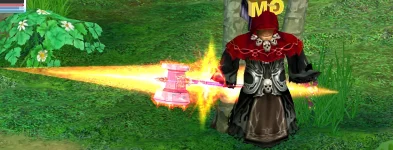
Hey everyone, has anyone solved the glow issue? I have the same problem: the +13 glow isn't visible at all on one-handed swords, and on the hammer it's distorted: instead of dots, there are dashes and not all the way around. At the front of the hammer, instead of a spiral, there are barely noticeable straight lines. Any help would be greatly appreciated. Thanks.