


Hello everyone,
I have a question regarding the UI system and texture mapping.
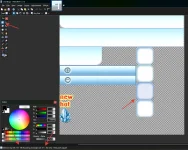
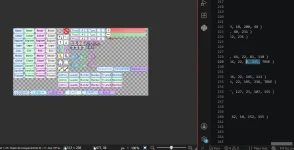
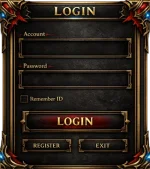
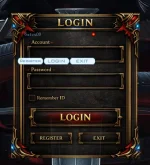
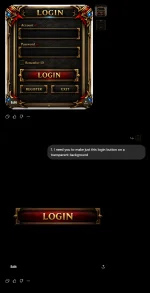
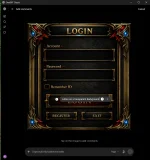
I'm currently creating and editing my own game interfaces (inventory, chat, windows, etc.). While analyzing the source code, I noticed that a single texture file contains multiple UI elements, and each element is rendered using a specific set of coordinates that define which part of the texture should be displayed.
My question is:
How do experienced developers work with these texture coordinates (UV coordinates or texture atlas regions) efficiently?
Is there a recommended workflow or tool to identify exactly which section of the texture corresponds to each UI element, instead of modifying the coordinates by trial and error?
I would like to learn how to edit these regions more accurately and understand how the coordinate system works internally.
Any documentation, tutorials, or advice would be greatly appreciated.
Thank you!
_________________________________________________________________________________________________________________________________________________________________________________________________
Hola a todos.
Tengo una duda sobre el sistema de interfaces y el mapeo de texturas.
Actualmente estoy creando y editando mis propias interfaces del juego (inventario, chat, ventanas, etc.). Al analizar el código fuente, noté que un solo archivo de textura contiene varios elementos de la interfaz, y que cada uno utiliza un conjunto de coordenadas que indican qué parte de esa textura debe mostrarse.
Mi pregunta es la siguiente:
¿Cómo trabajan los desarrolladores experimentados con estas coordenadas de textura (coordenadas UV o regiones de un atlas de texturas) de forma eficiente?
¿Existe algún flujo de trabajo, herramienta o método recomendado para identificar exactamente qué sección de la textura corresponde a cada elemento de la interfaz, sin tener que modificar las coordenadas por prueba y error?
Me gustaría aprender a editar estas regiones con mayor precisión y comprender cómo funciona internamente este sistema de coordenadas.
Cualquier documentación, tutorial o consejo será muy bien recibido.
¡Muchas gracias!
I have a question regarding the UI system and texture mapping.
I'm currently creating and editing my own game interfaces (inventory, chat, windows, etc.). While analyzing the source code, I noticed that a single texture file contains multiple UI elements, and each element is rendered using a specific set of coordinates that define which part of the texture should be displayed.
My question is:
How do experienced developers work with these texture coordinates (UV coordinates or texture atlas regions) efficiently?
Is there a recommended workflow or tool to identify exactly which section of the texture corresponds to each UI element, instead of modifying the coordinates by trial and error?
I would like to learn how to edit these regions more accurately and understand how the coordinate system works internally.
Any documentation, tutorials, or advice would be greatly appreciated.
Thank you!
_________________________________________________________________________________________________________________________________________________________________________________________________
Hola a todos.
Tengo una duda sobre el sistema de interfaces y el mapeo de texturas.
Actualmente estoy creando y editando mis propias interfaces del juego (inventario, chat, ventanas, etc.). Al analizar el código fuente, noté que un solo archivo de textura contiene varios elementos de la interfaz, y que cada uno utiliza un conjunto de coordenadas que indican qué parte de esa textura debe mostrarse.
Mi pregunta es la siguiente:
¿Cómo trabajan los desarrolladores experimentados con estas coordenadas de textura (coordenadas UV o regiones de un atlas de texturas) de forma eficiente?
¿Existe algún flujo de trabajo, herramienta o método recomendado para identificar exactamente qué sección de la textura corresponde a cada elemento de la interfaz, sin tener que modificar las coordenadas por prueba y error?
Me gustaría aprender a editar estas regiones con mayor precisión y comprender cómo funciona internamente este sistema de coordenadas.
Cualquier documentación, tutorial o consejo será muy bien recibido.
¡Muchas gracias!