


Hi everyone,

I need advice on how to improve my Tales of Pirates client. I have attached a video showing the problems.
I downloaded Montana’s 2022 DX9 release and have been customizing my server, mainly decorating Argent, editing object placement and collisions, and changing some building textures.
I am not a programmer. I work with AI coding assistants such as Codex and Claude through their apps and terminals. They have helped me make many changes, but my own ability to understand, modify and debug the source code is limited.
The 120 FPS work has turned into repeated patching, compiling and testing. Each attempt takes time and consumes a significant amount of my AI usage allowance, but the underlying problems remain unresolved. I cannot reliably judge whether the suggested changes are appropriate for this engine.
That is why I am asking here: I would appreciate guidance from people familiar with this codebase before continuing with more experimental patches.
Across different patch attempts, my character’s apparent movement speed also changed. Some versions introduced considerable stuttering.
Another problem is that almost the entire world sometimes disappears into a solid blue background, while parts of the HUD, names and some effects remain visible. Opening the inventory with the I key temporarily made the world render correctly again.
The inventory’s animated 3D character preview was already unreliable before these experiments. This may be relevant, but I do not know whether the problems share the same cause.
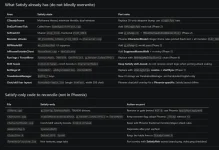
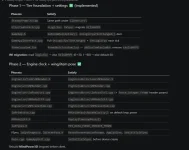
Additional frames draw the current world state between game updates. No general interpolation system has been implemented.
A flag called g_bMPPresentationOnly was added to distinguish additional draws from draws allowed to advance those systems. Guards were added around selected render-side updates, and the effect delta exposed by ResMgr.GetDailTime() is temporarily set to zero during presentation-only draws.
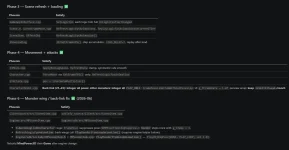
A later attempt introduced g_bMPLegacyVisualTick, alternating on each game update. The intended rates are now:
The 30 Hz visual rate was an experimental attempt to address the acceleration. We have not established that it is correct for every affected subsystem.
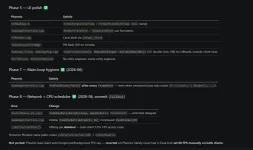
The latest patch also restores the main camera view and world projection before each scheduled draw. This was intended to address additional frames potentially inheriting the UI camera state, especially because opening the inventory temporarily affected the blue rendering problem.
However, these counters alone do not establish that movement and animation speeds are correct. The patch compiles, but we do not have a validated solution. The attached video shows the problems encountered during testing; the latest camera-restoration change still needs full in-game validation.
Can similar shadows be implemented reliably in this 2022 DX9 base? Is there a public implementation, source patch or tutorial you would recommend?
I understand that better shadows have a performance cost. Adjustable quality, shadow distance and an option to disable them on weaker PCs would be ideal.
I started with Montana’s 2022 DX9 release, but I have also seen alexxstst’s 2026 x64 DX9 version:
I do not know whether I downloaded the wrong files for my goals or whether the 2022 release is a suitable base that simply needs the correct implementation.
If switching bases is the recommended path, the work I need to preserve is my customized Argent: its decoration, object placement, collision edits and custom textures. I do not mind starting over with accounts, characters or the interface.
Given these goals and the changes described above, which path would you recommend? Links to the exact release, patch, tutorial or relevant source code would be very helpful.
I can provide the modified source files or a diff if needed. Thank you for taking the time to help.
I need advice on how to improve my Tales of Pirates client. I have attached a video showing the problems.
I downloaded Montana’s 2022 DX9 release and have been customizing my server, mainly decorating Argent, editing object placement and collisions, and changing some building textures.
I am not a programmer. I work with AI coding assistants such as Codex and Claude through their apps and terminals. They have helped me make many changes, but my own ability to understand, modify and debug the source code is limited.
The 120 FPS work has turned into repeated patching, compiling and testing. Each attempt takes time and consumes a significant amount of my AI usage allowance, but the underlying problems remain unresolved. I cannot reliably judge whether the suggested changes are appropriate for this engine.
That is why I am asking here: I would appreciate guidance from people familiar with this codebase before continuing with more experimental patches.
What I want to achieve
- Smooth gameplay at 120 FPS, with normal character movement and correctly timed monster animations, wings, fairies, skills and environmental effects.
- Better directional shadows for characters, buildings and scenery, giving the impression of sunlight.
- Preserve my customized Argent, including object placement, collision edits and modified textures.
What is going wrong
The FPS counter reaches approximately 120, and some aspects feel smoother. However, many animated elements become visibly too fast: wings, fairies, the rotating GM logo, dropped item bags moving up and down, monster animations, leaves and butterflies.Across different patch attempts, my character’s apparent movement speed also changed. Some versions introduced considerable stuttering.
Another problem is that almost the entire world sometimes disappears into a solid blue background, while parts of the HUD, names and some effects remain visible. Opening the inventory with the I key temporarily made the world render correctly again.
The inventory’s animated 3D character preview was already unreliable before these experiments. This may be relevant, but I do not know whether the problems share the same cause.
What the patch actually changes
The following is a summary of the source changes made with AI assistance. We are rebuilding Game.exe and MindPower3D_D8R.dll from the 32-bit DX9 source and testing them in a separate client copy.1. Separating rendering from game updates
In GameAppInterface.cpp, the patch keeps CSteadyFrame driving game updates at a target of 60 Hz and adds a QueryPerformanceCounter timer to schedule rendering at up to 120 FPS.Additional frames draw the current world state between game updates. No general interpolation system has been implemented.
2. Preventing additional draws from advancing effects again
Some animation and effect updates were found inside rendering functions.A flag called g_bMPPresentationOnly was added to distinguish additional draws from draws allowed to advance those systems. Guards were added around selected render-side updates, and the effect delta exposed by ResMgr.GetDailTime() is temporarily set to zero during presentation-only draws.
3. Trying a separate update rate for legacy visuals
The initial 60 Hz update / 120 FPS render split still produced accelerated effects.A later attempt introduced g_bMPLegacyVisualTick, alternating on each game update. The intended rates are now:
- Gameplay updates: 60 Hz.
- Selected legacy animations and effects: 30 Hz.
- Rendering: 120 FPS.
The 30 Hz visual rate was an experimental attempt to address the acceleration. We have not established that it is correct for every affected subsystem.
4. Investigating graphics state left behind by the UI
The animated inventory preview and HUD portraits were disabled.The latest patch also restores the main camera view and world projection before each scheduled draw. This was intended to address additional frames potentially inheriting the UI camera state, especially because opening the inventory temporarily affected the blue rendering problem.
5. Adding timing logs
Earlier logs showed approximately 60 game updates and 120 renders per second. The latest revision also logs the visual update frequency.However, these counters alone do not establish that movement and animation speeds are correct. The patch compiles, but we do not have a validated solution. The attached video shows the problems encountered during testing; the latest camera-restoration change still needs full in-game validation.
What is the correct implementation approach?
- Is there a public, tested 120 FPS patch for Montana’s 2022 DX9 source?
- What are the intended update rates for gameplay, model animations and particles in this version?
- Which systems advance by frame count, and which already use elapsed time?
- Is the approach described above incorrect, particularly the separate 30 Hz visual update?
- Should animation and effect timing be converted to elapsed time instead?
- Is interpolation required for characters, monsters and effects to look smooth at 120 FPS while their underlying logic updates less frequently?
- Which source files or functions need to be changed together?
- Does anyone recognize the blue rendering issue that temporarily disappears when opening the inventory?
What about better shadows?
I have seen other TOP clients with directional shadows that follow character and scenery shapes, rather than only dark circles beneath characters.Can similar shadows be implemented reliably in this 2022 DX9 base? Is there a public implementation, source patch or tutorial you would recommend?
I understand that better shadows have a performance cost. Adjustable quality, shadow distance and an option to disable them on weaker PCs would be ideal.
Did I choose the right release?
Before continuing, I would really appreciate advice on which base to use.I started with Montana’s 2022 DX9 release, but I have also seen alexxstst’s 2026 x64 DX9 version:
I do not know whether I downloaded the wrong files for my goals or whether the 2022 release is a suitable base that simply needs the correct implementation.
- Can Montana’s 2022 version reliably support smooth 120 FPS and improved directional shadows?
- Should I keep this base and apply a known patch?
- Would you recommend alexxstst’s 2026 x64 version or another release instead?
- Does the 2026 version already address these timing and shadow features, or would they still require additional development?
- Is moving to DirectX 11 actually necessary, or can both goals be achieved with DirectX 9?
- Which option would be easier to maintain and troubleshoot, considering stability, compatibility, documentation and community support?
If switching bases is the recommended path, the work I need to preserve is my customized Argent: its decoration, object placement, collision edits and custom textures. I do not mind starting over with accounts, characters or the interface.
Given these goals and the changes described above, which path would you recommend? Links to the exact release, patch, tutorial or relevant source code would be very helpful.
I can provide the modified source files or a diff if needed. Thank you for taking the time to help.


 layPose</span> uses <span>30.0f / fps</span>, plus the <span>IsGlitched</span> multiplier.